
Guides November 26, 2026 6 min read
Where AI coding agents quietly hide 20+ GB on your Mac
You closed the terminal weeks ago, merged the pull request, and moved on. Meanwhile, your SSD is still holding onto gigabytes of transcripts, SQLite logs, and orphaned worktrees.
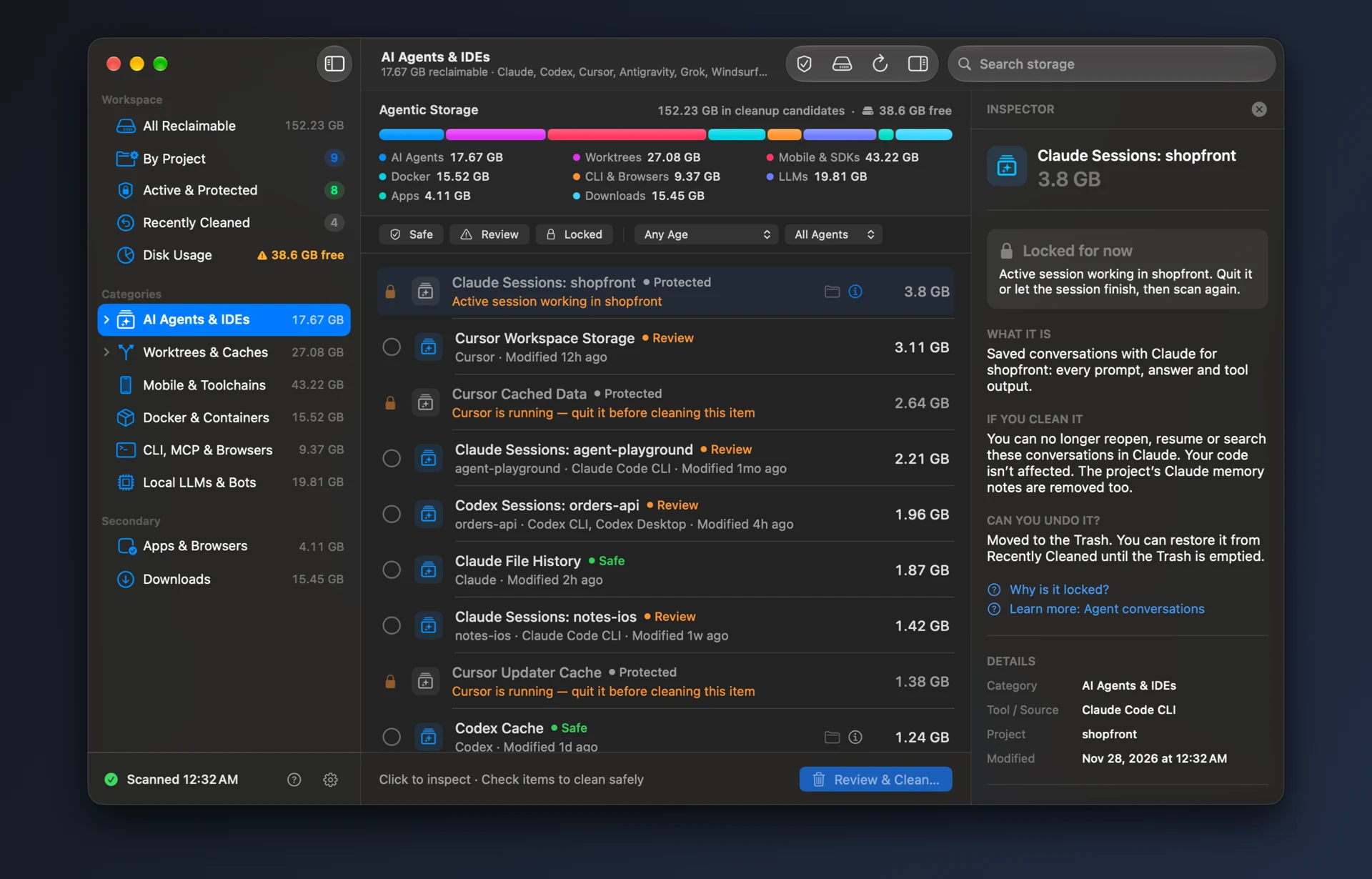
Traditional macOS storage utilities were designed around a simpler era: browser caches, old Mail attachments, and leftover .dmg installers. If you spend your week running Codex, Claude Code, Cursor, or Antigravity across multiple repositories, those tools miss where the real bloat actually lives.
On a typical active developer Mac, 15 to 40 GB of reclaimable space sits inside hidden dotfiles, per-worktree dependency folders, and agent transcript directories that never prune themselves.
1. Agent transcripts & SQLite state
Every tool-call output, file diff, screenshot, and recovery snapshot gets persisted locally so agents can resume threads. After a few weeks of heavy debugging, a single hidden directory can quietly pass 4 GB.
| Tool | Location | What accumulates |
|---|---|---|
| Codex | ~/.codex/ |
Session logs, recovery folders, generated images, SQLite thread history |
| Claude Code | ~/.claude/projects/ |
JSONL session transcripts, debug logs, shell snapshots |
| Cursor / Windsurf | ~/Library/Application Support/ |
Workspace storage, extension caches, old indexing databases |
| Playwright / MCP | ~/Library/Caches/ms-playwright/ |
Multiple Chromium & WebKit browser binaries pinned by version |
Watch out for live locks. Never delete an active agent’s SQLite database (such as thread_history_1.sqlite) while the desktop app or CLI is running. Quit the app first or let a lock-aware tool protect it automatically.
2. The Git worktree multiplier
Running parallel coding agents in separate Git worktrees is one of the best productivity unlocks of the past year—and the fastest way to fill a 512 GB MacBook Pro. Each worktree checks out its own copy of the repository and installs its own node_modules, .venv, or .next build cache.
# Inspect all active worktrees registered for a repository
git worktree list --porcelain
Three finished feature branches with node_modules and .next easily total 4 to 6 GB even after the pull requests are merged and deleted on GitHub.
3. Mobile toolchains & stale runtimes
If your agents also run iOS or Android builds, Xcode DerivedData, orphaned iOS Simulator runtimes, Rustup toolchains, and CocoaPods caches regularly add another 10 to 30 GB. Most of these regenerate cleanly on the next build, though older simulator runtimes are best pruned intentionally.
A safer way to clean
Running blind rm -rf commands across hidden dotfiles is how developers accidentally wipe .env secrets or lose an unmerged worktree. A safe routine follows three simple rules:
- Check what’s running first — skip caches and SQLite files held open by live apps or terminals.
- Verify git status — never delete a worktree that still has uncommitted edits.
- Move to Trash, don’t unlink — keep a one-click escape hatch until you’ve verified your builds still pass.
AgentTidy for macOS scans agent logs, worktrees, and toolchain caches locally with Active & Protected locks built in.
Get AgentTidy →